大佬求助,模型加了gis不显示
发布于 2026-05-28 17:53:07
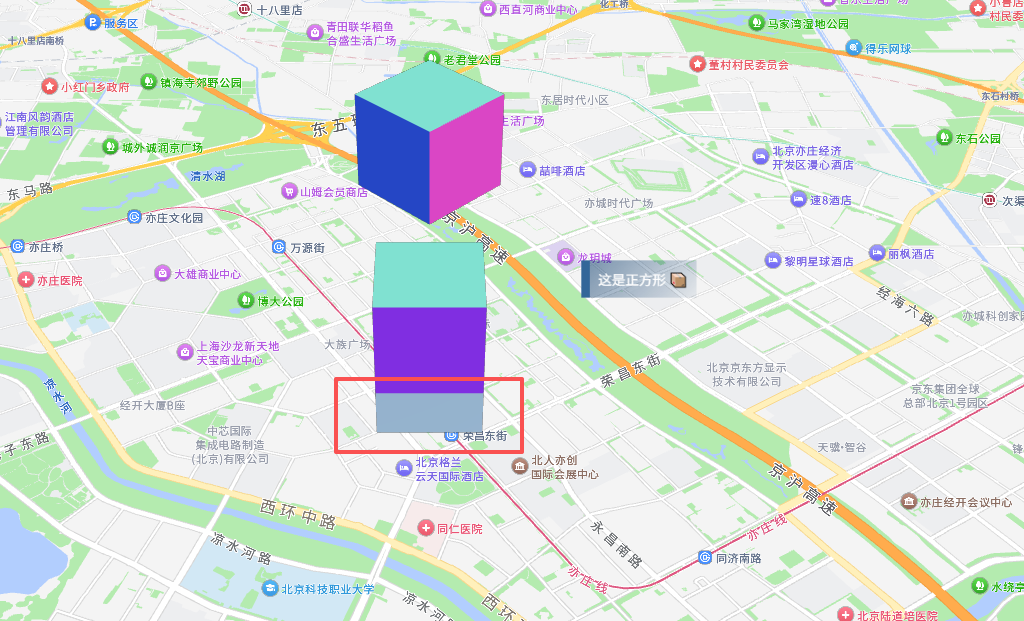
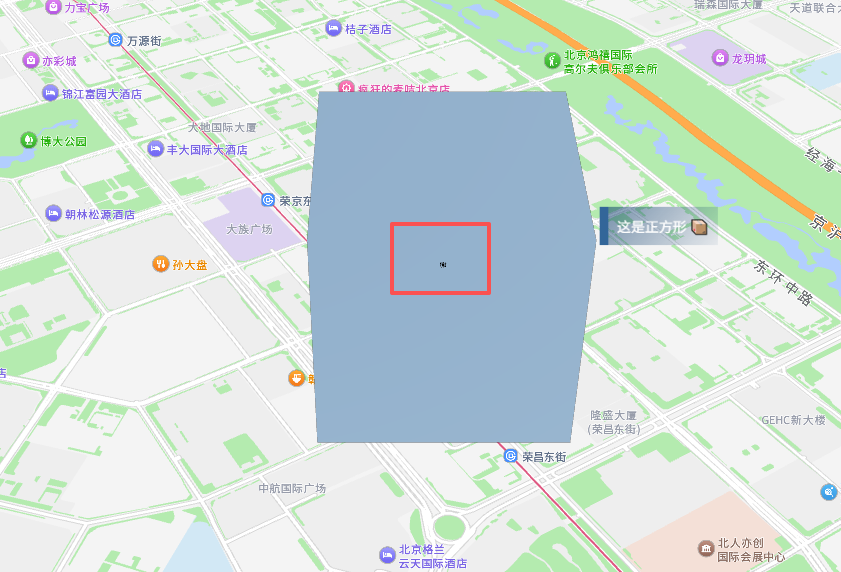
我用官方案例改的,但是模型不显示多了个盒子,我猜这是我的原模型
很感谢,实在找不到原因
这是我的代码:
    <mapContainer :center="mapCenter" />
    <loading useResourceManager />
    <TresCanvas id="tresCanvas" v-bind="tcConfig">
        <TresPerspectiveCamera :position="cameraPosi" :fov="75" :aspect="1" :near="0.1" :far="10000" />
        <OrbitControls :max-distance="30" :max-polar-angle="Math.PI / 2" makeDefault
            :target="new THREE.Vector3(-0.44,1.26,1.04)" />
        <!--     <TresAmbientLight :color="0xffffff" :intensity="0.5" />
        <viewportGizmo v-bind="viewportConfig" /> -->

        <skylight v-bind="sState" />
        <glbsList @send-data="handleReceive" v-if="Resource.hasAllFinished.value" />
        <!-- <tresProcessing />
        <basiceEnv v-bind="basiceEnvState" /> -->
        <domPanel :position="[1.6473240780912544,0.9325614397906987,12.729060471738496]" :rotation="[0,0,0]"
            :scale="[1,1,1]" name="dom面板" uuid="22294e28-499c-44ee-8b83-0e019367743c" :castShadow="false"
            :receiveShadow="false" :renderOrder="0" :visible="true" v-bind="eMeshState0" :clickFun="onPanelClick" />
        <!-- <Suspense>
            <skyBox :texture="skyBoxImg" />
        </Suspense> -->
        <TresMesh :position="[0, 0, 500]">
            <TresBoxGeometry :args="[1000, 1000, 1000]" />
            <TresMeshNormalMaterial />
        </TresMesh>

        <TresMesh :position="[0, 1500, 1500]" :rotation="[0, 0, Math.PI / 4]">
            <TresBoxGeometry :args="[1000, 1000, 1000]" />
            <TresMeshNormalMaterial />
        </TresMesh>

        <mergeTres :center="mapCenter" />
    </TresCanvas>
</template>
<script setup lang="ts">
    import mapContainer from "../components/mapContainer.vue"
    import mergeTres from "../components/mergeTres.vue"
    import skyBoxImg from '@/images/3d54cb932252419c2569b6be16dfca4e.jpeg'
    import { ref, onMounted, reactive } from 'vue'
    import skyBox from 'PLS/skyBox/components/skyBoxAmesh.vue'
    import * as THREE from 'three'
    import { OrbitControls } from '@tresjs/cientos'
    import { viewportGizmo } from 'PLS/useViewportGizmo'
    import { Resource } from 'PLS/resourceManager'
    import { basiceEnv } from 'PLS/skyBox'
    import { yangyangLoading as loading } from 'PLS/UIdemo'
    import { weatherCanvas } from 'PLS/digitalCity'
    import floor from '../components/floor.vue'
    import weather from '../components/weather.vue'
    import skylight from '../components/skylight.vue'
    import glbsList from '../components/glbsList.vue'
    import tresProcessing from '../components/tresProcessing.vue'
    import extendMeshes from '../components/extendMeshes.vue'
    import dynamicComMeshes from '../components/dynamicComMeshes.vue'
    import { useWebDataRuntime } from '@/common/webDataSource'
    import { domPanel } from 'PLS/UIdemo'

    const eMeshState0 = { "center": false, "transform": true, "sprite": true, "distanceFactor": 5, "domContent": "<div class=\"boxStyle1 pos-relative left-20 top--30 text-white\" style=\"padding: 10px;border-left: 10px solid #336699;background-image: linear-gradient(132deg, #00336680, #00336610);\">\n                这是正方形 📦\n            </div>" }
    const fState = null
    const gridState = { "cellSize": 0.6, "cellThickness": 1, "cellColor": "#6f6f6f", "sectionColor": "#63e2b7", "sectionSize": 3.3, "sectionThickness": 1.5, "fadeDistance": 25, "fadeStrength": 1, "infiniteGrid": true }
    const basiceEnvState = { "type": "sunset", "on": true, "environmentIntensity": 0.6, "environmentRotations": { "x": 0, "y": 0, "z": 0 } }
    const wState = { "isRain": false, "isSnow": false, "isCloud": false, "rainConfig": { "type": "rain", "speed": 10, "size": 5, "count": 100, "intensity": 1, "lightning": false, "lightningStrength": 0.55, "color": "#fff" }, "snowConfig": { "type": "snow", "speed": 10, "size": 5, "count": 100, "intensity": 1, "color": "#fff" }, "cloudConfig": { "color": "#ffffff", "segments": 56, "volume": 0.1, "opacity": 0.8, "seed": 0, "fade": 10, "growth": 10, "speed": 0.06, "bounds": { "x": 15.8, "y": 0, "z": 15.8 }, "position-y": 6 } }
    const sState = { "curTime": 8, "direct": 0, "intensity": 1, "shadowIntensity": 1, "toneMapping": 4, "toneMappingExposure": 1 }
    const pState = { "isOpenList": {}, "configList": {} }
    const viewSettingsState = { "antialias": true, "shadows": true, "powerPreference": "default" }
    const cameraPosi = ref([13.04, 9.46, 11.8])
    const mapCenter = [116.52, 39.79]
    // const tcConfig = reactive({
    //     windowSize: true,
    //     alpha: true,
    //     antialias: true,
    //     clearAlpha: 0,
    //     renderMode: 'manual',
    //     shadows: viewSettingsState.shadows,
    //     toneMapping: THREE.ACESFilmicToneMapping,
    //     toneMappingExposure: 0.6,
    //     shadowMapType: THREE.PCFSoftShadowMap,
    //     powerPreference: viewSettingsState.powerPreference,
    //     clearColor: '#201919',
    // })
    const tcConfig = reactive({
        // windowSize: true,
        alpha: true,
        antialias: true,
        clearAlpha: 0,
        renderMode: 'manual'
    })
    const onPanelClick = (e) => {
        console.log('我被点击了!', e)
        alert('点击成1功')
    }
    // 动画控制变量
    const isAnimating = ref(false)
    const startPos = ref([0, 0, 0])
    const endPos = ref([0, 0, 0])
    const animationDuration = 800 // 动画时长 毫秒
    const startTime = ref(0)

    // 平滑动画函数
    function animateCameraUpdate() {
        if (!isAnimating.value) return
        const elapsed = Date.now() - startTime.value
        const t = Math.min(elapsed / animationDuration, 1)

        // 缓动公式(更丝滑)
        const easeT = t === 1 ? 1 : 1 - Math.pow(2, -10 * t)

        // 平滑插值
        cameraPosi.value = [
            startPos.value[0] + (endPos.value[0] - startPos.value[0]) * easeT,
            startPos.value[1] + (endPos.value[1] - startPos.value[1]) * easeT,
            startPos.value[2] + (endPos.value[2] - startPos.value[2]) * easeT,
        ]

        if (t < 1) {
            requestAnimationFrame(animateCameraUpdate)
        } else {
            isAnimating.value = false
        }
    }

    // 你原来的方法,替换成这个
    const handleReceive = (str) => {
        console.log('父组件收到:', str.name)

        // 启动动画
        startPos.value = [...cameraPosi.value]
        // endPos.value = [str.name.x, str.name.y, str.name.z]
        endPos.value = [26, 25, -23]
        isAnimating.value = true
        startTime.value = Date.now()
        animateCameraUpdate()
    }
    const viewportConfig = {
        size: 100,
        lineWidth: 2,
        type: 'sphere',
        placement: 'bottom-right',
        offset: {
            right: 10,
        },
    }

    Resource.loadResources([

        { functionName: 'GLTFLoader', url: './plugins/wangz/glbs/水厂流程.glb' },
        { functionName: 'GLTFLoader', url: './plugins/wangz/glbs/山坡.glb' },

    ])
</script>

<style scoped>
    /* #tresCanvas {
        z-index: -1 !important;
    } */
</style>入代码关注者
0
被浏览
874


 shader
 WebGL
WebGL cesium
 threeJS
 gis
gis 模型
模型 glsl
glsl



大小尺度有问题吧
@hawk86104 你好,我看了下可能是组件冲突了,您看我源码中,地图组件用
js<mapContainer :center="mapCenter" />模型组件用js<glbsList @send-data="handleReceive" v-if="Resource.hasAllFinished.value" />是不是不能兼容